Convert Markdown to PDF Online
Convert your Markdown to PDF in seconds with ProPDF. Customize without CSS, preview live and download a watermark-free PDF on your browser.
- From Device
- From URL
- From Dropbox
- From Google Drive
- From OneDrive
Or drag and drop files
Paste or upload your Markdown, customize the styling, and download a polished, print-ready PDF with headings, tables, and code blocks formatted to match your preview.
Why Choose ProPDF to Convert Your Markdown to PDF?
Download PDFs Without Watermarks
Export clean, professional PDFs without watermarks, ready to share, print, or publish.
Customize PDF Styling Without Writing CSS
Customize fonts, colors, and layouts using simple styling controls, without writing a single line of CSS.
Preview Changes As You Edit
See your formatting updates in the live preview as you edit your Markdown, so you can refine your document before downloading.
Create PDFs In Multiple Languages
Generate PDFs with correct rendering of Chinese, Japanese, and Korean (CJK) text, right-to-left scripts, and color emoji by default.
Convert MD to PDF With Full Control Over the Look
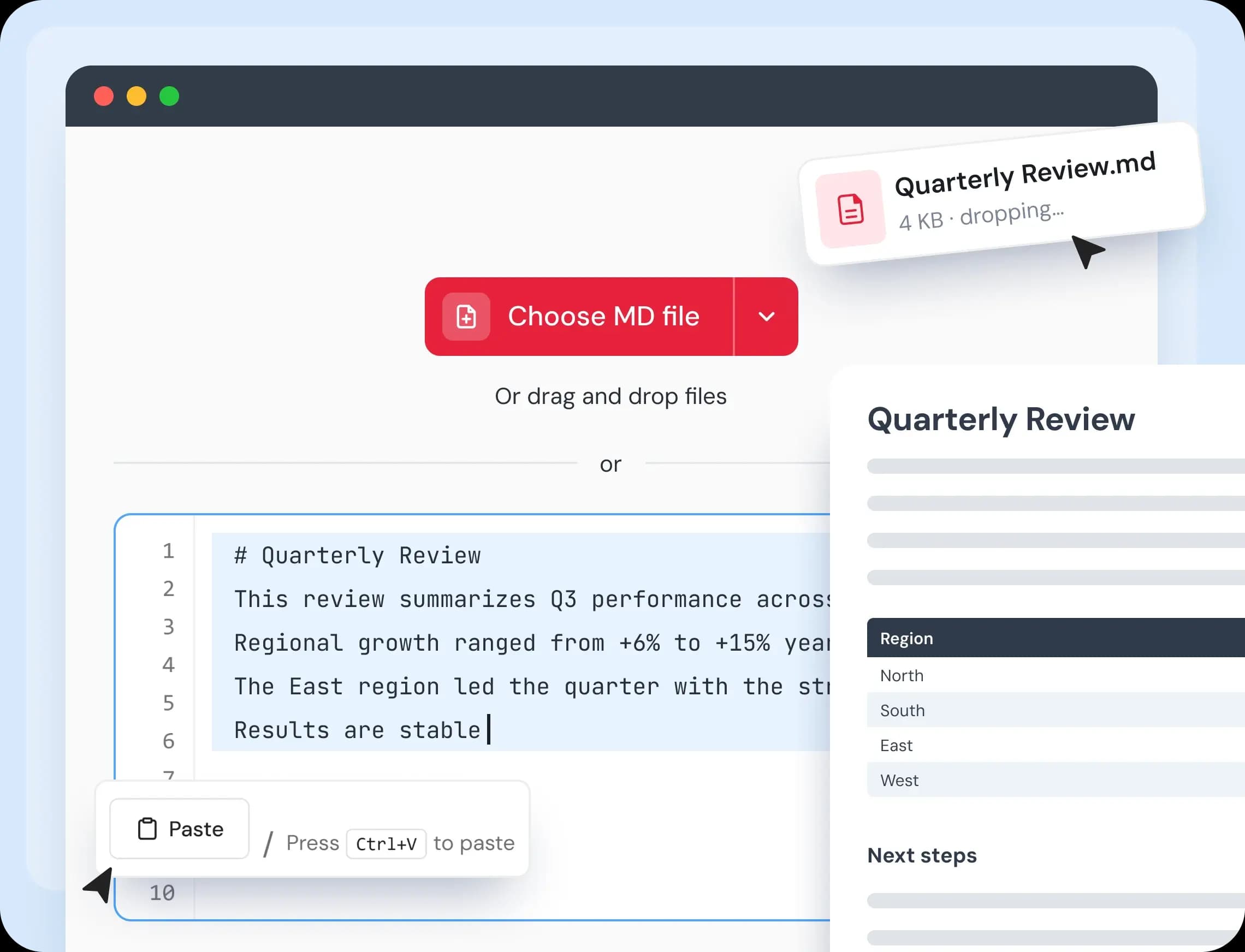
Paste Your MD Text or Upload an MD File
Copy an answer from your AI assistant, a page from your notes app, or a README from your project, and paste it straight in. The editor opens right away with a real-time preview beside it. Prefer files? Upload an MD file from your device or cloud storage, or drag it onto the page.
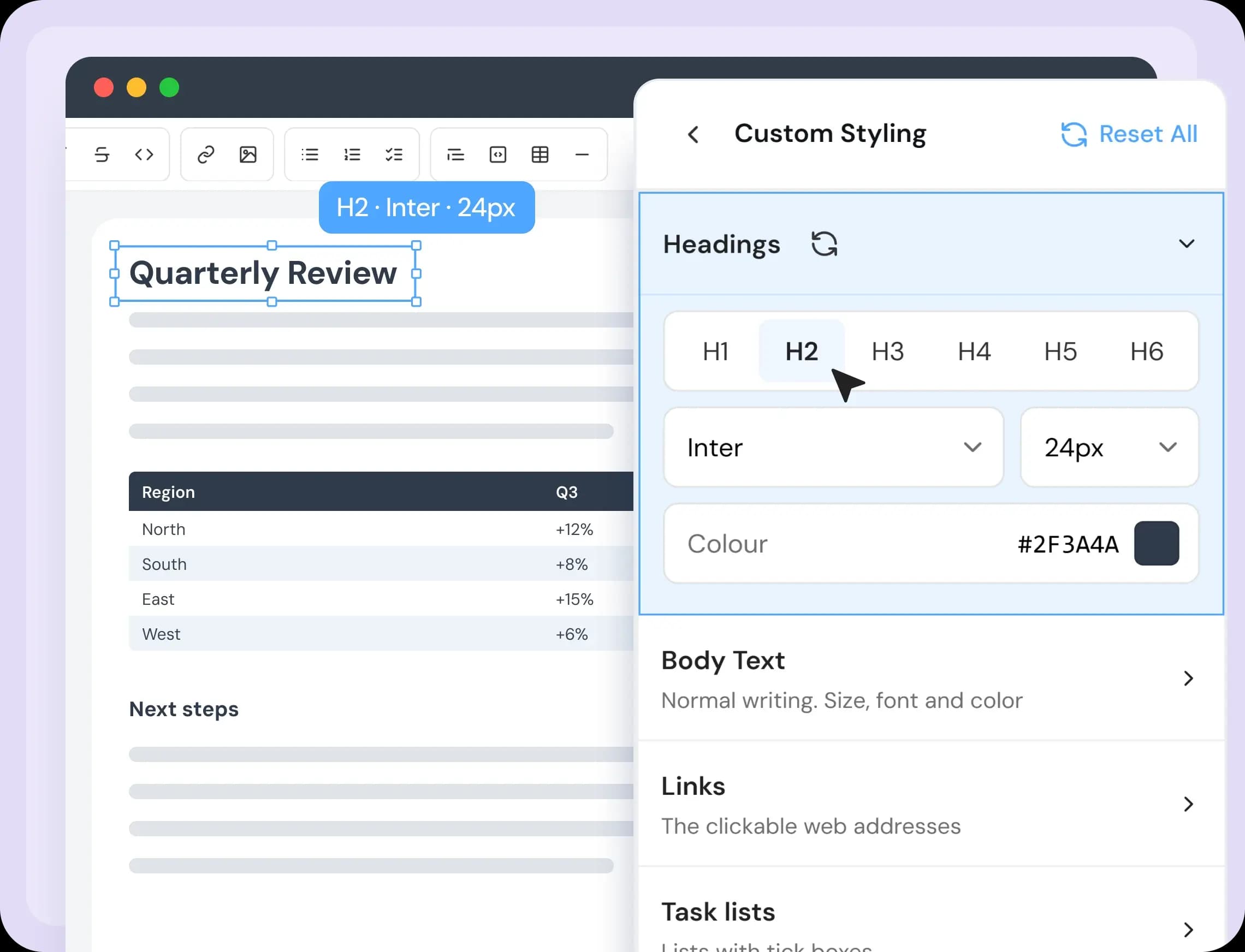
Customize Every Element Your Way
Need more control over your PDF? Customize ten elements individually, from headings and links to tables, code, lists, math, and diagrams. Adjust each element with simple settings, see what you've changed from the preset, and reset individual groups or entire sections whenever you want - all without writing CSS.
Convert Your MD File to PDF in 4 Steps
- 1
Add Your Markdown File
Upload a .md file, drag and drop it onto the page, or paste your Markdown text directly into the editor.
- 2
Edit and Preview Your Content
Edit your Markdown using the formatting toolbar and line numbers. See your changes in the live preview as you type, with synchronized scrolling to keep your editor and preview aligned.
- 3
Customize Your PDF Style
Choose a preset, color scheme, font size, and typeface in PDF Settings. Select your preferred page size and orientation, or customize individual elements for greater control over your document's appearance.
- 4
Export and Download Your PDF
Click Generate PDF to convert your MD to PDF. ProPDF takes you to the download page, where you can save your finished document without a watermark.
Everything You Need to Convert Your Markdown to PDF
Convert Markdown to PDF with a free online tool that lets you write, format, preview, and export your documents in one place.
- Three Ways to Get Started
- Upload a file, drag and drop it into the editor, or paste your Markdown directly. Supports .md, .markdown, .mdown, .mkd, and .txt files.
- Live Markdown Preview
- See your formatted document beside your Markdown source, updating as you type so you can check changes as you work.
- Easy Formatting Toolbar
- Add headings from H1 to H6, lists, links, images, tables, code blocks, and diagrams without memorizing Markdown syntax.
- Syntax-Highlighted Code Blocks
- Display code more clearly with syntax highlighting based on the programming language you specify.
- LaTeX Math and Mermaid Diagrams
- Add mathematical formulas using LaTeX and create diagrams with Mermaid. Both render in the preview and exported PDF.
- GFM and CommonMark Support
- Format tables, task lists, footnotes, and blockquotes with support for GitHub Flavored Markdown (GFM) and CommonMark.
- Flexible Page Sizes and Orientation
- Choose from A4, A3, A2, A5, Letter, or Legal page sizes, with portrait and landscape orientations to suit your document.
- Ready-Made Templates
- Get started quickly with eight templates for common document types, including resumes, reports, changelogs, and meeting notes.
- Built-In Markdown Reference
- Look up Markdown elements and insert examples directly at your cursor with one click.
A Free Online Markdown to PDF Converter for All Types of Users
One simple tool for every user who writes in Markdown.
- Developers
- Convert README files, API documentation, and technical notes into professional PDFs that are easy to share with clients, teammates, and non-technical audiences.
- Writers and Documentation Teams
- Turn drafts from your notes app or code editor into well-formatted guides, articles, and documentation ready to share or publish.
- Students and Researchers
- Export study notes, academic papers, mathematical formulas, and diagrams as clean PDFs. Use the Academic preset to give your documents a more formal, structured layout.
- Business and Legal Teams
- Convert meeting minutes, internal notes, and document drafts into shareable PDFs.
Your Privacy Is Safe With ProPDF
We built ProPDF with security in mind from the start. Every file you upload is protected with SSL/TLS encryption. Your documents are processed in a private, isolated environment and removed from our servers automatically after a few hours. We never store, reuse, or view your files for any reason.
- Encrypted Transfers
- Every upload and download goes through SSL/TLS encryption. Your file is secure from the moment you upload it to the moment you save it.
- Auto File Deletion
- Your files are deleted from our servers a few hours after processing. Nothing is kept, reused, or accessed after your session is done.
- Isolated File Processing
- Each file is handled in its own secure environment, completely separate from other users' files.
- ISO-Certified Data Centers
- ProPDF runs on data centers with 24/7 monitoring, advanced firewalls, and strict physical and network security standards.
Frequently Asked Questions
How to convert Markdown to PDF online for free?
To convert Markdown to PDF online for free, upload your .md file, drag and drop it into the editor, or paste your Markdown text. Preview the formatted document, customize its styling, and download it as a PDF without installing software.
How to convert a Markdown table to PDF online for free?
Upload your Markdown file or paste text containing a Markdown table into the editor. The converter renders the table in the preview, allowing you to check its layout before downloading the document as a PDF.
Can I create a PDF from Markdown text without a file?
Yes. Paste your Markdown text into the editor or upload a supported file. Use the formatting toolbar and styling settings to customize your document, check the live preview, and export it as a PDF.
Can I export Markdown with LaTeX math?
Yes. You can write mathematical formulas using LaTeX syntax and preview the rendered equations before exporting your Markdown document as a PDF.
Can I convert an .md file to PDF?
Yes. Upload your .md file to the converter, review the formatted content, and download it as a PDF. You can also use supported formats such as .markdown, .mdown, .mkd, and .txt.
What is the difference between TXT and Markdown?
A TXT file contains plain text without formatting, while Markdown uses simple symbols like # for headings and * for lists to structure content. This tool supports .txt files that contain Markdown syntax. If your file contains plain text without Markdown formatting, use TXT to PDF instead.
Does the Markdown to PDF converter support code blocks and diagrams?
Yes. The converter supports fenced code blocks with syntax highlighting based on the specified programming language, as well as Mermaid diagrams that render in the preview and exported PDF.
Can I change how my PDF looks without writing CSS?
Yes. Start with one of five presets, then change the color scheme, text size, and typeface. For more control, style ten elements one by one, such as headings, tables, and code. Every option is a simple setting, so you never need to write CSS.
Can I convert HTML files to PDF?
Yes. If your content is written in HTML or you need to convert raw HTML files, use our HTML to PDF converter.
Is it safe to use ProPDF's Markdown to PDF?
Yes. Your files are encrypted with SSL/TLS, processed in an isolated environment, and deleted from our servers within 8 hours. We never share, sell, or use your files for training.
Ready to Convert Your Markdown to PDF?
Upload your MD file or paste your Markdown to create a polished PDF in seconds. Free to use, watermark-free, and no signup required.
Developed by the team behind FreeConvert, trusted by millions worldwide, ProPDF delivers the same secure, dependable experience for handling your documents.